feb 02, 2025
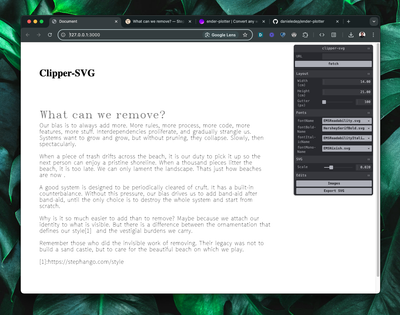
🔗 Convert any webpage to SVG and plot it
Here is how this was achieved:
-
Run a Node application that fetches a URL, uses mozilla/readability to turn that page to a simplified document with only the minimally-styled page content, what you normally see when you turn on Reader-mode on your browser of choice
-
The result of this transformation is written to a client-side
index.html, here is how some CSS splits the result into separate pages.
:root {
	--page-width: 14cm;
	--page-height: 21cm;
	--page-gutter: 100px;
}

#content {
	width: var(--page-width);
	height: var(--page-height);

	column-width: var(--page-width);
	column-gap: var(--page-gutter);
}
The neat thing about this is that the column-width CSS property makes paginating really easy, while using physical units as cm to control the pages dimensions. These don't match perfectly with the real world centimeters of course, because its actual size depends from screen pixel density and DPI but it's good enough for this experiment. The CSS variables are editable with the control panel using cocopon/tweakpane.
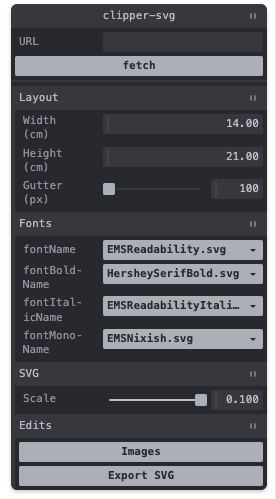
- Next, a convoluted recursive function parses the block elements of the DOM, and converts the text to SVG paths. If only parsing this beautiful soup of block and inline elements was easy as it sounds, the browser would have suffered much less.

# Hershey text
This project uses the library techninja/hersheytextjs to convert the text content to SVG. This library is a javascript port of the great Hershey Text Inkscape Plugin. The library reads font data from SVG font files, containing the letter paths of a font family and renders them inside a SVG element.
return renderText(node.textContent, {
	font: selectedFont,
	scaleFont: scaleFont,
	pos: { x: 0, y: yOffset },
});
Those fonts are Hershey fonts, a set of characters made of single vector paths, developed around 1967 by Dr. Allen Vincent Hershey at the Naval Weapons Laboratory, to be displayed on early cathode ray tube displays.
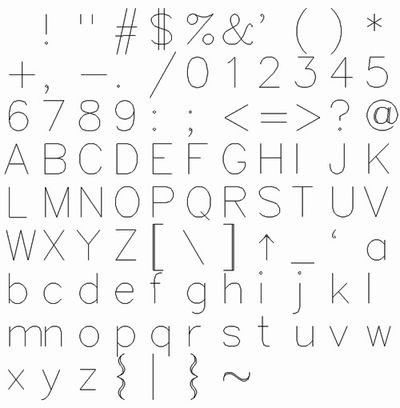 Set of Hershey characters
Their path-only, vector nature makes it very easy drawing text with CNC machines, and solves a few problems since vectorizing any piece of text creates an empty outline, and it doesn't work great with very small text.
# Images
It is possible to render images as SVG paths with some algorithms used in the pen-plotter world. Some of the most used ones can be compared with this great browser tool mitxela/plotterfun.
After evaluating a few of them, I decided to ditch images for the moment being. While the final effect is visually interesting it's very hard to convey effectively the content of an image of a typical online article. I wonder if some AI model could get any image in input and then style-transfer it to a realistic simplified line-art image and then convert that to SVG.
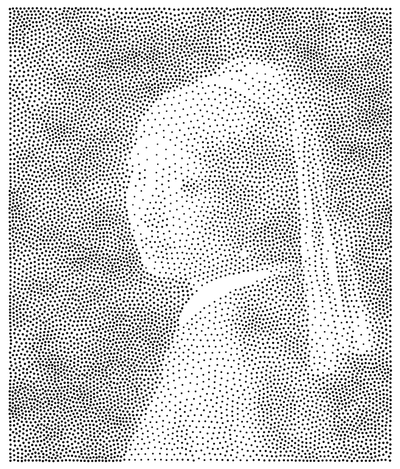 'Girl with a pearl earring' rendered in SVG using the Stipples algorithm
# Layout
In this project the HTML content is parsed block by block and is rendered using a different set of Hershey fonts. H1, H2, etc headings would use larger bold fonts, <em> are rendered with an italic font and code blocks with a mono-style font.
switch (element.parentNode.nodeName) {
	case "H1":
		renderedFont = PARAMS.fontBold.fontBoldName;
		scaleFont = 1.75;
		break;

	case "H2":
		renderedFont = PARAMS.fontBold.fontBoldName;
		scaleFont = 1.5;
		break;

	case "H3":
		renderedFont = PARAMS.fontBold.fontBoldName;
		scaleFont = 1.25;
		break;

	case "H4":
	case "H5":
	case "H6":
		renderedFont = PARAMS.fontBold.fontBoldName;
		scaleFont = 1.1;
		break;

	case "EM":
		renderedFont = PARAMS.fontItalic.fontItalicName;
		scaleFont = 1;
		break;

	case "PRE":
		renderedFont = PARAMS.fontMono.fontMonoName;
		scaleFont = 1;
		break;

	default:
		renderedFont = PARAMS.font.fontName;
		scaleFont = 1;
}
The output page would have the same dimensions of the HTML content paginated with the CSS properties column-width and height, with the possibility of then downloading the content split in different convenient separate files.
# Gcode
The final vision was to download the SVG files of any page and feed these into Inkscape to be converted to a gcode file with the workflow described before, Convert a 3D printer into a pen plotter.
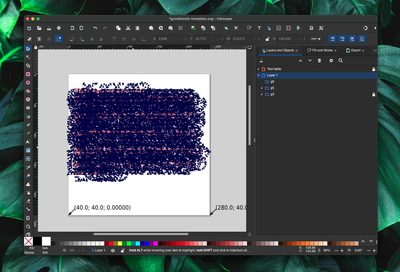 A blog post converted to gcode
This way, you could technically plot small neat pages of any interesting article, blog post or documentation to be binded together in a sort of physical reading list.
# Conclusions
Few things turned out to be pretty complicated such as parsing inline elements, especially when they would wrap onto new lines, also generally handling DOM nodes with javascript is messy.
As mentioned above, rendering images to SVG using AI would make for an interesting additional project but I'm wrapping this one up for the moment.
Many other ideas were continuously coming up out of this project, a browser extension, a markdown input mode, generate gcode directly in the browser, design a bespoke mini-plotter, and many more, but I've decided to move on to other projects.
# Resources
- cocopon/tweakpane
- Hatch fill
- Hershey fonts: not chocolate, the origin of vector lettering
- Hershey Text
- Hershey Text: An Inkscape extension for engraving fonts
- Hershey Vector Font
- jankovicsandras/imagetracerjs
- jvolker/single-line-font-renderer
- mitxela/plotterfun
- mozilla/readability
- msurguy/cnc-text-tool
- oskay/svg-fonts
- philschmid/clipper.js
- plottertools/hatched
- Plotting raster images
- StippleGen
- Stylized image binning algorithm
- techninja/hersheytextjs